
Disclaimer: Build vs buy cost comparisons, AI-generated code defect rates, and market statistics referenced in this article are based on industry research and vendor reports as of May 2026. Every organization’s technical expertise, compliance requirements, and risk tolerance differ. Run your own cost analysis before making build vs buy decisions. This article is for informational purposes only and does not constitute professional software engineering advice.
Editorial note: Automaiva selects and recommends tools based on independent research and real-world testing. We have no paid relationships with any vendor mentioned in this article. Tool recommendations reflect our independent analysis of build vs buy trade-offs.
Build vs Buy SaaS in 2026: The Hidden Costs of AI-Generated Code Nobody Talks About
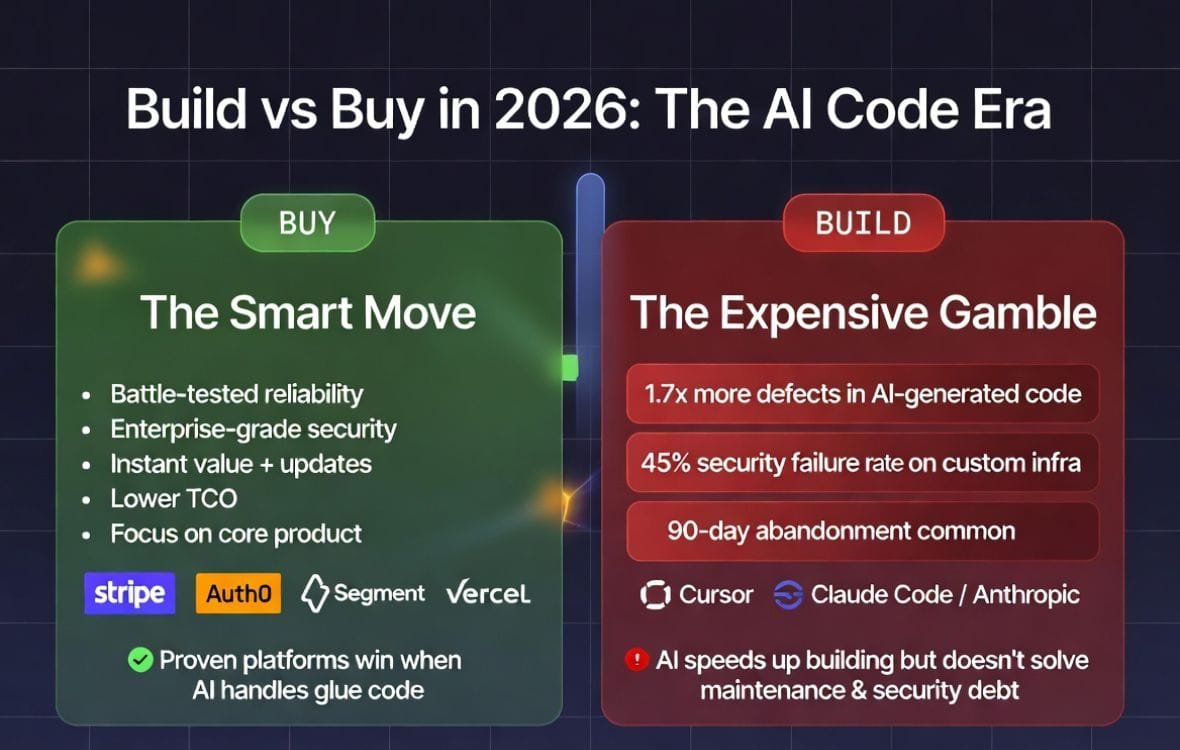
Build vs buy SaaS AI decisions are the cost-saving trap most founders fall into — because AI makes building look cheap until you discover that 45 percent of AI-generated code fails basic security tests and every custom tool you build becomes technical debt the moment it ships.
The $60,000 “Savings” That Cost $200,000
A medium-sized SaaS company decided to replace $20,000 worth of SaaS subscriptions with custom AI-built tools. The prototype shipped in two weeks. Leadership celebrated. Six months later, they had spent $60,000 on a developer’s salary just to keep the custom integrations from breaking. The tools failed twice a week. The sales team lost hours troubleshooting instead of selling. They quietly renewed their SaaS contracts and scrapped the custom builds. The 2026 data confirms this pattern is common: 35 percent of teams have replaced at least one SaaS tool with a custom build, but most small teams scrap their custom tools within 90 days [citation:4][citation:9]. This guide walks through the real build vs buy math — the hidden maintenance costs, security risks, integration nightmares, and technical debt that AI-generated code introduces — plus a decision framework that tells you exactly when building makes sense and when buying is still the right answer. Figures based on vendor-published research and industry data as of May 2026 and may not reflect all team experiences.
A founder described his build vs buy nightmare at a SaaS ops meetup last quarter. His team of 25 was paying $2,000 per month for various SaaS tools. He read the viral posts about AI replacing software subscriptions. He was convinced. He had a developer spend two weeks building custom tools for workflow automations and internal admin tasks. The prototype worked beautifully. He canceled the SaaS subscriptions. Then reality hit. The custom tools started breaking when APIs updated. Security vulnerabilities appeared in the code audit. The developer spent 20 hours per month on maintenance instead of building product features. After nine months, he had saved $18,000 in subscription fees and spent $45,000 on developer time keeping the tools alive. He went back to SaaS.
The build vs buy decision has changed. AI-assisted development tools like Cursor, Claude Code, and GitHub Copilot have collapsed the timeline to build working prototypes. But building a prototype is not the same as running production software for years. The hidden costs — maintenance, security, compliance, integration breakage, technical debt — are where the build vs buy math flips. This guide covers exactly those hidden costs, with real data from 2026 industry reports.
About this guide: The Automaiva team analyzed build vs buy data from CodeRabbit (470 pull requests), Veracode (100+ LLMs tested), Retool (817 builders surveyed), and Deloitte (3,200+ enterprise leaders), plus real-world case studies from small, medium, and enterprise companies. All statistics are sourced from publicly available reports as of May 2026.
Table of Contents
- The SaaSpocalypse Narrative vs Reality
- What Nobody Tells You About “Vibe Coding” Your Own SaaS
- The Real Math: Build vs Buy by Company Size
- Hidden Cost 1: The Maintenance Trap
- Hidden Cost 2: The Integration Nightmare
- Hidden Cost 3: Security and Compliance Gaps
- Hidden Cost 4: Technical Debt That Never Stops Growing
- Hidden Cost 5: The Migration Cost Nobody Budgets For
- When Building Actually Makes Sense
- When Buying Is Still the Right Answer
- The Decision Framework: 7 Questions to Ask Before Building
- Frequently Asked Questions
The SaaSpocalypse Narrative vs Reality
The narrative is seductive. Naval Ravikant argued recently that the moat protecting most SaaS businesses is dissolving. His core claim: the value historically locked inside mature software platforms came from the years of engineering required to build them, and AI-assisted coding tools have collapsed that timeline [citation:3]. A small team with Cursor or Claude Code can now produce in days what previously required a venture round and a multi-year roadmap.
The data backs the directional claim. As of 2026, 85 percent of developers regularly use AI tools for coding, debugging, and code review, and 46 percent of newly written code is AI-assisted, projected to reach 60 percent by year-end [citation:3]. The AI coding assistant market hit $12.8 billion in 2026, up 65 percent year-over-year. Cursor alone went from launch to $2 billion in annual recurring revenue with over one million paying users in under three years — the fastest revenue ramp in the history of developer tooling [citation:3].
The market reaction has already happened. On February 3, 2026, public SaaS valuations dropped a combined $285 billion in a single trading day — an event the financial press dubbed the “SaaSpocalypse” [citation:3]. The thesis behind the sell-off was simple: if non-developers can build custom software in minutes through natural language prompts, why would they keep paying $50–$200 per seat per month for off-the-shelf alternatives?
But here is what the narrative leaves out. The 18-month timeline circulating in the Naval discussion is hyperbole. The directional truth is real; the speed claim is wrong [citation:3]. And the data on AI-generated code quality tells a more complicated story.
What Nobody Tells You About “Vibe Coding” Your Own SaaS
AI coding tools are astonishingly good at generating working code quickly. But “working code” is not the same as “production-ready, secure, maintainable code.” The gap between the two is where hidden costs live.
| Metric | AI-Generated Code | Human-Written Code | AI Disadvantage |
|---|---|---|---|
| Total issues per pull request | 10.83 issues | 6.45 issues | 1.7x more issues [citation:1] |
| Logic and correctness errors | 1.75x more | Baseline | 75% increase [citation:6] |
| Security vulnerabilities | 1.5–2x more | Baseline | 50-100% more [citation:6] |
| Code that passes security tests | 55% | N/A | 45% fail basic tests [citation:2][citation:7] |
| Performance issues | 1.42x more | Baseline | 42% increase [citation:1] |
CodeRabbit’s analysis of 470 real-world open source pull requests found that AI-generated pull requests contain about 10.83 issues each, compared with 6.45 issues in human-generated PRs — roughly 1.7x more [citation:1][citation:10]. The severity also escalates: AI-authored PRs contain 1.4x more critical issues and 1.7x more major issues on average than human-written PRs [citation:1].
Veracode’s security testing of over 100 large language models across Java, Python, C#, and JavaScript found that 45 percent of AI-generated code samples failed security tests and introduced OWASP Top 10 vulnerabilities [citation:2]. Java was the riskiest language, with a 72 percent security failure rate [citation:2].
Cross-site scripting (XSS) vulnerabilities — one of the most common web security flaws — appear in 86 percent of relevant AI-generated code samples [citation:2]. The security pass rate for XSS scenarios is just 15 percent [citation:7].
This is the hidden cost that the “build your own tools” viral posts never mention. AI code looks right. It runs. It passes unit tests. It gets merged. And it contains security holes that attackers already have playbooks for [citation:7].
The Real Math: Build vs Buy by Company Size
The build vs buy decision looks completely different depending on your team size, technical expertise, and risk tolerance. Here is the reality for each segment.
| Company size | Typical SaaS spend | Build viability | The trap |
|---|---|---|---|
| Small (5-20 people) | $150–$300/month | Rarely worth it | Saving $300 costs 15+ hours/month in maintenance. Most scrap custom builds within 90 days. [citation:9] |
| Medium (20-150 people) | $2,000–$10,000+/month | Sometimes worth it | Save $20k in licensing, spend $60k+ on developer maintenance. Hidden integration and training costs kill ROI. [citation:9] |
| Enterprise (150+ people) | $50,000+/month | Rarely worth it | Security compliance, liability, and change management create insurmountable barriers. [citation:9] |
Small businesses (5-20 people): Your total SaaS bill is just $150–$300 a month. It feels light. Saving $300 is a poor trade if it costs you 15 hours a month in “accidental IT” work. Most small teams scrap their custom tools within 90 days and return to the subscriptions they tried to kill [citation:9].
Medium businesses (20-150 people): This is where the math gets interesting. You might “save” $20,000 in licensing fees, but you will spend $60,000 on a developer’s salary just to keep custom integrations from breaking [citation:9]. The math does not add up once you factor in the 2–3x hidden cost of internal ownership.
Enterprises (150+ people): Thousands of employees. Legacy systems. Clients in banking or healthcare who treat data like nuclear waste. Procurement and legal teams take four months just to review a single API integration [citation:9]. When a SaaS platform leaks data, they are contractually liable. When your custom tool leaks data, your CISO is in the hot seat. Enterprises buy SaaS for “one throat to choke” — a vendor who is contractually obligated to keep the system running [citation:9].
Hidden Cost 1: The Maintenance Trap
Building a tool with AI is fast. Running that tool at scale for five years is a different story. Software is not a static object. It is a living system that requires constant updates, security patches, and bug fixes [citation:5].
The prototype fallacy: A founder builds a custom payment dashboard over a weekend with Cursor. It works. On Monday, Stripe updates its API. The custom flow breaks. The founder spends 48 hours debugging code instead of selling. This pattern repeats every time any dependency changes [citation:9].
The maintenance math: A single self-hosted tool requires 2 to 4 hours of maintenance per month. A stack of 5 tools requires 10 to 20 hours per month. At a fully loaded engineering cost of $100 per hour, that is $1,000 to $2,000 per month in hidden maintenance labor. That often exceeds the SaaS subscription cost you were trying to save [citation:9].
The 90-day rule: Most small teams that build custom tools to replace SaaS quietly abandon them within 90 days [citation:9]. The prototype works. The maintenance doesn’t. The team quietly renews their SaaS subscriptions and never speaks of the experiment again.
Hidden Cost 2: The Integration Nightmare
SaaS vendors spend millions ensuring their tools integrate with the rest of your stack. Your custom tool has no such investment.
Retool’s 2026 Build vs Buy Shift Report, based on a survey of 817 builders, found that the top SaaS tools respondents have replaced or considered replacing include workflow automations (35 percent) and internal admin tools (33 percent) [citation:4]. These categories were always the most awkward fit for off-the-shelf software — every company’s internal workflows are different.
But the replacement pattern tends to be additive rather than wholesale. Nobody is ripping out Salesforce [citation:4]. They are replacing the specific pieces that never quite fit: an approval flow that required three workarounds, a dashboard that could not connect to their actual data. Those narrow replacements add up. Once a team builds one tool that works better than what they bought, the default question shifts from “What should we buy?” to “Can we build this?” [citation:4]
The integration math: Your sales team still needs live data from that old ERP. Migrating it would cost six figures, so you hack an integration. It fails twice a week. Tickets explode. Every integration you build becomes another point of failure that someone on your team must monitor and fix [citation:9].
Hidden Cost 3: Security and Compliance Gaps
This is the most dangerous hidden cost. Veracode’s testing of over 100 LLMs found that across Java, Python, C#, and JavaScript, AI-generated code fails security tests at alarming rates [citation:2].
| Language | Security failure rate | Risk |
|---|---|---|
| Java | 72% | Highest risk — most common enterprise language |
| C# | 45% | .NET shops beware |
| JavaScript | 43% | Web app vulnerabilities |
| Python | 38% | Lower but still significant |
Specific vulnerabilities AI models miss: Cross-site Scripting (XSS) — 86% failure rate [citation:2]. Log injection — 87% failure rate [citation:7]. Improper password handling — 1.88x more likely than human code [citation:1]. Insecure object references — 1.91x more likely [citation:1].
The compliance trap: An AI can write a functional payroll system, but it cannot sign a BAA for HIPAA or be SOC2 compliant on its own [citation:9]. When you build a custom tool, you inherit the full responsibility of a software publisher. You must certify your infrastructure, maintain security controls, and accept liability for breaches. In Deloitte’s 2026 State of AI in the Enterprise survey of 3,200+ leaders, data privacy and security ranked as the top AI concern at 73 percent, with governance capabilities close behind at 46 percent [citation:4].
Hidden Cost 4: Technical Debt That Never Stops Growing
Every custom agent you deploy is “legacy code” the moment it is finished. Unlike a SaaS provider, your custom tool does not have a dedicated team ensuring it stays compatible with the rest of your ecosystem [citation:9].
The technical debt multiplier: CodeRabbit’s analysis found that AI-generated code has significantly worse maintainability metrics. Code readability problems such as elevated naming and formatting inconsistencies increase by a factor of more than 3x [citation:6]. Formatting problems were 2.66 times more common in AI pull requests [citation:10]. AI code “looks right” at a glance but often violates local idioms or structure [citation:10].
The compounding problem: Technical debt compounds. Every hack you add to fix one problem creates two more. Each new developer who touches the code spends hours deciphering the AI-generated logic. The cost of maintaining the code increases every month it stays in production. A prototype built in a weekend becomes a maintenance burden that never ends.
Hidden Cost 5: The Migration Cost Nobody Budgets For
What happens when your custom tool stops working and you need to go back to SaaS? The migration cost is rarely budgeted and often devastating.
The export problem: Your custom tool stores data in its own database schema. Moving that data back to a SaaS vendor requires custom migration scripts, data validation, and often manual cleanup. A 12-month build experiment can require 2-4 weeks of engineering time to migrate back.
The retraining cost: Your team learned your custom tool. When you move back to SaaS, they must relearn the original tool — plus any features that were added while you were gone. Training costs for a 50-person team can exceed $10,000 in lost productivity.
The sunk cost fallacy: Most teams stick with broken custom tools far longer than they should because they have already invested so much time. This is the sunk cost fallacy in action. The question is not how much you have spent. It is whether continuing to spend is worth the outcome.
When Building Actually Makes Sense
Despite all the hidden costs, building custom tools still makes sense in specific scenarios.
✓ When building wins
- Internal tools for large teams: If you have 100+ employees using an internal admin panel, building custom can save money at scale
- Highly specific workflows: When your business process is genuinely unique and no SaaS tool fits within 20% of your needs
- You have in-house engineering: If you already employ full-time developers, the marginal cost of building internal tools is lower
- Data privacy requirements: When regulatory requirements prevent you from using any cloud SaaS vendor
- Competitive advantage: If the custom software is your product or a core differentiator, building is the only option
✗ When building fails
- Small teams: Your time is better spent on product development than maintaining internal tools
- Commodity software: Email marketing, team chat, scheduling, and analytics have excellent SaaS options
- No dedicated engineering: If maintenance falls on founders or non-technical staff, build costs exceed savings
- Compliance-heavy industries: Healthcare, finance, and government require vendor-provided compliance certifications
- Mission-critical systems: Do not build your own payroll, CRM, or accounting software
Real example of building that worked: A 200-person SaaS company built a custom internal tool for managing customer onboarding workflows. The workflow had 47 unique steps, required integration with 6 internal systems, and changed weekly. No SaaS tool could keep up. They built it. It saved 300 hours per month. The maintenance cost was justified by the scale of the savings.
When Buying Is Still the Right Answer
For most SaaS teams, buying remains the correct decision for most tool categories. Here is why.
SaaS vendors guarantee uptime and liability: When a SaaS platform leaks data, they are contractually liable and insured for it. When your custom tool leaks data, the CISO is in the hot seat. AI agents do not sign indemnity clauses [citation:9].
SaaS vendors maintain integrations: SaaS vendors spend millions ensuring their tools integrate with everything. Your custom tool will break every time a dependency changes. Stripe updates an API. Slack changes a webhook format. Your custom integration fails. You fix it. It fails again next month.
SaaS vendors provide compliance certifications: SOC 2, HIPAA, GDPR, ISO 27001 — these certifications cost SaaS vendors hundreds of thousands of dollars annually to maintain. Your custom tool has none of them. Your enterprise customers will ask for them. You will not have them [citation:9].
The 35% reality: Retool’s report found that 35 percent of teams have replaced at least one SaaS tool with a custom build [citation:4]. That means 65 percent have not. The vast majority of teams are still buying, not building, for most of their stack.
The Decision Framework: 7 Questions to Ask Before Building
Before you decide to build a custom tool — even with AI assistance — ask these seven questions.
Question 1: How many people will use this tool? If the answer is under 20, building rarely saves money. The SaaS subscription cost divided across 20 people is usually less than the engineering time to maintain a custom build.
Question 2: Does this tool touch customer data or financial transactions? If yes, the security and compliance requirements increase dramatically. Veracode found that 45 percent of AI-generated code fails basic security tests [citation:2]. For customer-facing tools, that risk is unacceptable without dedicated security review.
Question 3: Do you have dedicated engineering headcount for maintenance? Building is a weekend. Maintaining is forever. If maintenance falls on founders or non-technical staff, do not build. The opportunity cost of lost focus is greater than the subscription savings.
Question 4: Is there a SaaS tool that meets 80% of your needs? If yes, buy it. The 20% gap is rarely worth the 100% maintenance burden. SaaS tools improve over time — your custom tool only improves when you invest time.
Question 5: Will this tool need to integrate with other systems? Every integration is a point of failure. SaaS vendors maintain integrations for you. Custom tools require you to maintain them yourself. The more integrations, the stronger the case for buying.
Question 6: Is this tool core to your business or just overhead? If the tool is your product or a competitive advantage, build it. If it is overhead (team chat, email marketing, scheduling, analytics), buy it. Spend your engineering time on what differentiates you.
Question 7: What is your plan for when the person who built this leaves? Custom tools built by one person become orphaned when that person leaves. SaaS tools have vendor support. If you cannot answer this question, do not build.
Frequently Asked Questions
What is the build vs buy decision in SaaS?
The build vs buy decision is whether to build custom software internally or purchase an existing SaaS solution. Building gives you control and customization. Buying gives you predictable costs, vendor-maintained security, and less internal maintenance burden. With AI coding tools, building has become faster, but the long-term maintenance costs remain the deciding factor.
Is AI making SaaS obsolete?
Not in the way viral posts suggest. AI coding tools have reduced the cost to build prototypes, but the long-term costs of maintenance, security, compliance, and integration have not decreased. The market reacted with a $285 billion valuation drop in February 2026, but the reality is more nuanced. The vulnerable layer is not the core pillars (CRM, HRIS, ERP) but the constellation of small SaaS tools that fill gaps between pillars [citation:3]. Most companies are not ripping out Salesforce. They are replacing niche workflow automations and internal admin tools [citation:4].
How many teams have replaced SaaS with custom AI tools?
Retool’s 2026 Build vs Buy Shift Report found that 35 percent of teams have replaced at least one SaaS tool with a custom build, and 78 percent plan to build more custom tooling in 2026 [citation:4]. However, the replacement pattern is additive, not wholesale. Teams are replacing specific pieces that never quite fit — an approval flow, a dashboard, a niche integration — not core systems like CRM or ERP. The report also found that the top categories for replacement are workflow automations (35%) and internal admin tools (33%) [citation:4].
What is the security risk of AI-generated code?
Veracode tested over 100 large language models and found that 45 percent of AI-generated code samples failed security tests and introduced OWASP Top 10 vulnerabilities [citation:2]. For Java, the failure rate was 72 percent [citation:2]. Cross-site scripting (XSS) vulnerabilities appear in 86 percent of relevant AI code samples [citation:2]. Only 55 percent of AI-generated code passes basic security tests [citation:7]. These are not edge-case issues — they are common, well-documented vulnerabilities that attackers actively exploit.
Is AI-generated code worse than human-written code?
Yes, in terms of defect density and security. CodeRabbit’s analysis of 470 pull requests found that AI-generated code has 1.7x more issues on average than human-written code, including 1.4x more critical issues and 1.7x more major issues [citation:1]. AI code also has 1.75x more logic errors, 1.64x more maintainability issues, 1.57x more security findings, and 1.42x more performance issues [citation:1]. The only area where AI outperformed humans was spelling — human code had 1.76x more spelling errors [citation:1].
When should you build vs buy in 2026?
Build when: you have 50+ employees using an internal tool, your workflow is genuinely unique with no SaaS fit, you already employ full-time developers, or regulatory requirements prevent cloud SaaS. Buy when: you have under 20 employees, the tool touches customer data or financial transactions, you have no dedicated maintenance headcount, or a SaaS tool meets 80 percent of your needs. The decision framework in this guide provides seven specific questions to ask before building.
What is the SaaSpocalypse?
“SaaSpocalypse” is the term coined for the $285 billion drop in public SaaS valuations on February 3, 2026, driven by investor fears that AI-assisted development would make traditional SaaS tools obsolete [citation:3]. The thesis was that if non-developers can build custom software through natural language prompts, they will stop paying for off-the-shelf SaaS. While the market reaction was real, the actual replacement pattern is more limited. As of mid-2026, core SaaS pillars (CRM, ERP, HRIS) remain largely unaffected, while niche workflow and admin tools are the primary replacement targets [citation:3][citation:4].
How much does it cost to maintain a custom-built tool?
For a single tool, expect 2 to 4 hours of maintenance per month. For a stack of 5 tools, 10 to 20 hours per month. At a fully loaded engineering cost of $100 per hour, that is $1,000 to $2,000 per month — often exceeding the SaaS subscription cost you were trying to save. Medium businesses often spend $60,000+ annually on developer time just to maintain custom integrations that replaced $20,000 in SaaS licensing [citation:9]. Most small teams scrap their custom builds within 90 days when they realize the maintenance burden exceeds the savings [citation:9].
Pricing note: All SaaS pricing and developer salary estimates in this article are accurate as of May 2026 and subject to change. Your specific build vs buy math will vary based on your team’s technical expertise, location, and specific requirements. Always run your own cost analysis before making build vs buy decisions.
More from Automaiva
- Open Source vs SaaS 2026: When to Self-Host (And When to Pay) – Cost Comparison & Alternatives
- SaaS Automation Breaking in Production? 5 Silent Failure Modes and How to Fix Them (2026)
- SaaS Pricing Models 2026: How to Choose + A/B Test Your Way to Higher Revenue
- Full SaaS Security Stack Cost: What a 20-Person B2B Team Actually Spends in 2026
- AI Sales Prospecting Tools for SaaS 2026: 7 Platforms That Find Qualified Leads
Written by the Automaiva Editorial Team