
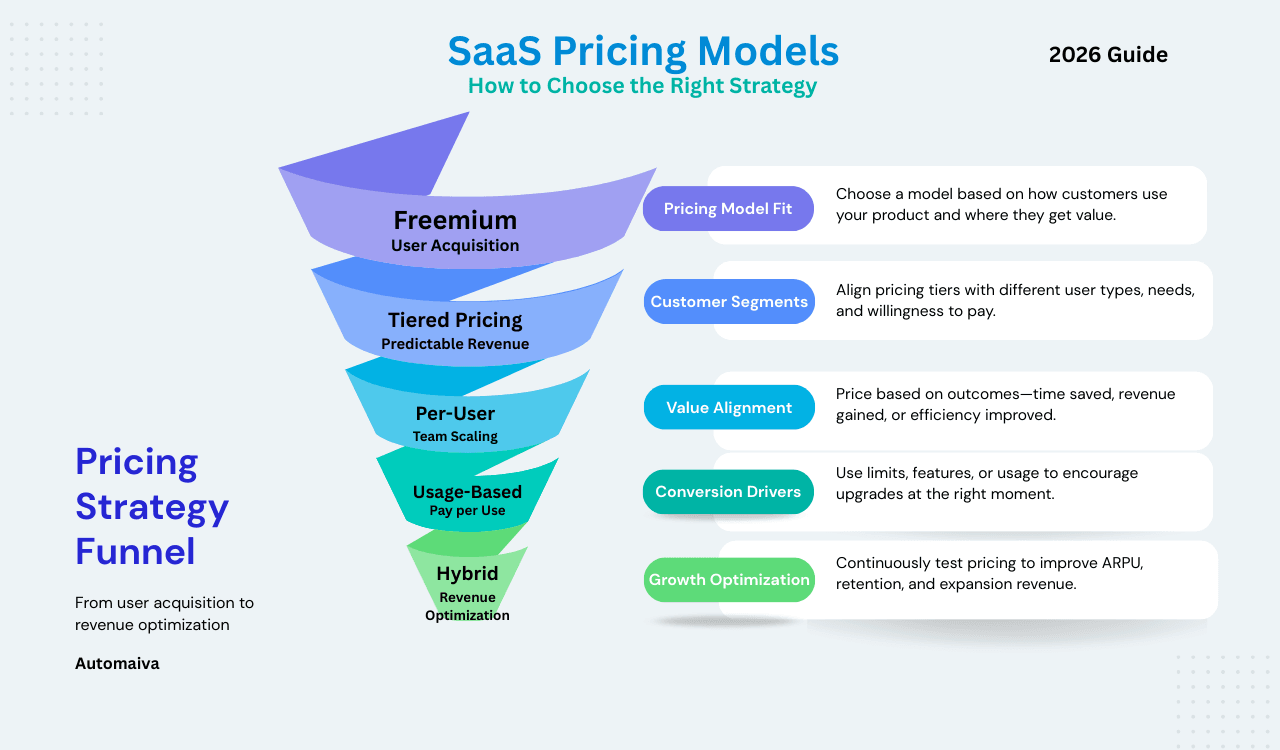
Updated: May 2026
Disclaimer: The pricing models, benchmarks, and strategies in this guide are based on industry research and real-world examples as of May 2026. Every business is unique. Test assumptions with your specific customer base before implementing major pricing changes. For specific financial or legal advice, consult qualified professionals.
Quick Answer
The best SaaS pricing models in 2026 combine a base subscription with usage-based components (hybrid pricing). For early-stage startups, start with tiered pricing (3 tiers: Basic, Pro, Enterprise) or per-user pricing. As you scale and add AI features, add usage-based components. Research shows that 46% of SaaS companies now take a hybrid approach, and 85% of SaaS leaders have adopted usage-based components.
A few years ago, I watched a founder do something strange. He had built a solid B2B SaaS product, had paying customers, and was growing. But he sat in his office, staring at a spreadsheet, paralyzed.
“I don’t know if I’m charging too little or too much,” he said. “And I’m scared to change it.”
That fear is common. Pricing feels permanent. Change it and you might anger customers. Leave it and you might leave money on the table. So most founders set a number early, based on a competitor or a guess, and never touch it again.
Here’s what I’ve learned since then: pricing isn’t a one-time decision—it’s a continuous experiment.
Research shows that improving pricing by just 1% can increase profits by up to 11%. Yet most SaaS companies spend only a few hours developing their initial pricing model—less time than they choose their logo font.
This guide isn’t about finding the perfect price—because it doesn’t exist. It’s about understanding the models available, knowing which one fits your product and customers, and building a system to test and evolve over time.
Table of Contents
- Why Old SaaS Pricing Models Are Breaking
- The Seven Core SaaS Pricing Models
- Real SaaS Pricing Examples (2026)
- How to Choose Your Pricing Model
- Decision Matrix: Which Model Fits Your Product?
- Common Pricing Mistakes (And How to Avoid Them)
- How to Test and Evolve Your Pricing
- Implementation Tools: How to Bill Complex Models
- A/B Testing Tools: Convert, VWO, and Price Intelligently
- The Future: Why Hybrid Is Winning
- Frequently Asked Questions
Why Old SaaS Pricing Models Are Breaking
For nearly two decades, SaaS pricing meant one thing: per-user subscriptions. Simple, predictable, easy to bill. Companies like Salesforce built empires on it.
But that model is cracking. Three things changed:
First, AI broke the unit economics. When a single AI agent can replace dozens of human seats, charging per user makes no sense. The value isn’t in access—it’s in output, tokens, compute minutes, and tasks completed.
Second, customers got smarter. Enterprise buyers realized they were overprovisioning licenses to cover fluctuating needs. They now demand pricing that reflects actual usage, not just access. More than 40% of SaaS companies now operate usage-based pricing, with another 17% actively testing it.
Third, competition intensified. In crowded SaaS categories, pricing flexibility became a competitive advantage. Static monthly fees no longer cut it when competitors offer pay-as-you-go options.
The result? Hybrid and usage-based models are now the fastest-growing pricing strategies. According to industry research, 46% of SaaS companies now take a hybrid approach, and 85% of SaaS leaders have adopted usage-based components.
The Seven Core SaaS Pricing Models
Let’s walk through the main models, with real examples and practical trade-offs.
1. Flat-Rate Pricing
One product, one price. Customers pay a consistent monthly or yearly fee for full access.
| Aspect | Details |
|---|---|
| Best for | Simple products, niche markets with little competition, predictable usage patterns |
| Pros | Extremely simple to sell and bill; predictable revenue; customers understand it instantly |
| Cons | No upselling opportunities; heavy users drain resources while light users feel overcharged |
Example: Audible offers two simple plans at $7.95 and $14.95 per month. Listen to one book or twenty—price stays the same.
2. Tiered Pricing
Multiple packages at different price points, each with a unique feature mix. This is the most common SaaS model, averaging 3-4 tiers.
| Aspect | Details |
|---|---|
| Best for | Diverse customer bases with varying needs and usage patterns |
| Pros | Attracts different segments; clear upgrade paths; scalable as customer needs grow |
| Cons | Risk of choice overload; feature gating can frustrate customers; requires careful balancing |
Example: Zapier offers five tiers, from free to “Company” level, each with progressively more features and higher limits.
3. Per-User (Seat) Pricing
Customers pay based on the number of individuals using the product.
| Aspect | Details |
|---|---|
| Best for | Team collaboration tools, project management platforms, CRMs |
| Pros | Predictable revenue scaling; easy for customers to understand; straightforward sales process |
| Cons | Account sharing can reduce revenue; growth stalls when teams freeze hiring; small startups may find it expensive |
Example: Salesforce uses per-user pricing, scaling costs as organizations add team members.
4. Usage-Based Pricing
Customers pay based on measurable consumption: API calls, storage, compute minutes, transactions processed.
| Aspect | Details |
|---|---|
| Best for | API-first products, infrastructure tools, AI workloads with variable compute costs |
| Pros | Low barrier to entry; revenue scales with customer success; aligns cost with actual value |
| Cons | Unpredictable revenue; customers fear “bill shock”; requires robust metering and transparent dashboards |
Example: AWS pioneered this model, charging for storage, compute, and queries based on actual consumption.
5. Freemium
A free basic version with paid upgrades for advanced features.
| Aspect | Details |
|---|---|
| Best for | Products with viral potential, daily-use tools, PLG strategies |
| Pros | Massive user acquisition; organic growth; free users become advocates |
| Cons | Low conversion rates (typically 3-5%); free users consume support resources; balancing free vs paid is tricky |
Example: Slack starts free with 90-day message history, then upgrades to unlimited history and advanced features.
6. Value-Based Pricing
Prices set based on the perceived value to the customer, not production costs.
| Aspect | Details |
|---|---|
| Best for | Products with measurable business impact (revenue increase, cost savings, efficiency gains) |
| Pros | Highest revenue potential; strong customer loyalty; aligns with business outcomes |
| Cons | Complex to implement; requires deep customer research; risky if market perceptions shift |
Example: Intercom’s AI chatbot Fin charges $0.99 per conversation resolved without human intervention—priced on outcome, not effort.
7. Hybrid Models
Combine two or more approaches, typically a base subscription plus usage-based components.
| Aspect | Details |
|---|---|
| Best for | AI products, platforms with variable usage, companies transitioning from legacy models |
| Pros | Predictable baseline revenue + usage-driven upside; flexibility for different customer types; captures value from power users |
| Cons | Complex to bill and meter; requires sophisticated infrastructure; customers need education |
Example: GitHub Copilot charges a monthly subscription that includes a set number of AI completions, with options to purchase more. Cursor follows a similar model with base subscription plus overage fees.
Real SaaS Pricing Examples (2026)
| Company | Model | Pricing (Starting) | Key Insight |
|---|---|---|---|
| Slack | Freemium → Tiered | Free, $8.75–$15/user/month | Limits message history to drive upgrades |
| Notion | Freemium → Tiered | Free, $10–$15/user/month | Feature-gating for advanced collaboration |
| Zoom | Freemium → Per-host | Free, $14–$20/host/month | 40-minute limit pushes conversion |
| GitHub | Freemium → Tiered | Free, $4–$21/user/month | Free for individuals, paid for teams |
| Salesforce | Per-user (Tiered) | $25–$300+/user/month | Complexity and features scale pricing |
| Twilio | Usage-based | Pay-as-you-go | Pure usage-based API monetization |
| Intercom Fin | Outcome-based | $0.99/resolved conversation | Priced on outcome, not effort |
How to Choose Your Pricing Model: Four Critical Factors
Factor 1: Frequency of Usage
If usage is daily or multiple times per day, usage-based pricing creates friction. Users mentally calculate costs before every action. Slack is the classic example—per-message pricing would kill adoption. Flat or tiered pricing works better. If usage is sporadic or unpredictable, usage-based pricing makes perfect sense.
Factor 2: Magnitude of Cost Savings
If you’re saving customers significant money (replacing human labor), you can justify premium transactional pricing. AI products that automate tasks previously done by employees can charge based on the labor cost saved.
Factor 3: Integration Point in the Workflow
If you’re the first line of contact handling all volume, you have predictable revenue. If you’re further downstream handling only complex edge cases, your volume depends on their operational decisions—favoring subscription models.
Factor 4: Customer Budget Type
Software budgets are fixed and scrutinized. Labor budgets are larger and tied to outcomes. If you can credibly replace labor, you can price proportionally to that labor cost, opening larger total addressable markets.
Decision Matrix: Which Model Fits Your Product?
| If your product… | Consider this model | Example |
|---|---|---|
| Helps individuals work smarter daily | Per-user or flat-rate | Slack, Notion |
| Automates sporadic tasks | Usage-based | Twilio, AWS |
| Replaces manual labor | Value-based or hybrid | AI copilots, automation platforms |
| Requires top-down enterprise buy-in | Tiered with custom contracts | Salesforce, Workday |
| Benefits from viral adoption | Freemium → tiered | Zoom, Dropbox |
| Has high fixed costs + variable usage | Hybrid (base + usage) | GitHub Copilot, Cursor |
Common Pricing Mistakes (And How to Avoid Them)
Mistake 1: Underpricing to attract users. Low prices attract bargain hunters who flood your support inbox, churn quickly, and rarely generate enough revenue to justify the effort. Fix: Price based on value, not cost. Remember: a 1% price increase drives an average 11% profit boost. Start higher than feels comfortable—lowering prices later is easy; raising them risks backlash.
Mistake 2: Copying competitors blindly. Your competitor’s pricing reflects their costs, customer base, and value proposition—not yours. Fix: Do competitive research to understand market ranges, then set your price based on your specific value delivery.
Mistake 3: Too many tiers. Choice overload paralyzes customers. Research shows too many options reduce conversion rates. Fix: Start with 2-3 tiers. Test adding more later—removing tiers without annoying existing customers is much harder than adding them.
Mistake 4: Ignoring economic value. If you don’t quantify your product’s economic impact, customers will default to price-based comparisons. Fix: Calculate dollar values for benefits like time saved, revenue increased, or risk mitigated. Use these in your messaging.
Mistake 5: Never testing. Pricing feels permanent, so founders avoid changing it. But markets shift, products evolve, and competitors emerge. Fix: Treat pricing as an experiment. Test new tiers on new customers first. Track metrics like conversion rate, churn, and ARPU.
How to Test and Evolve Your Pricing
A 2025 study found that only 4% of SaaS companies saw a slowdown after changing pricing. The other 96% grew faster.
Step 1: Audit your current pricing. Ask yourself: Has ARPU grown with your product improvements? Is net revenue retention above 100%? Do you rely heavily on discounts? Do low-value users consume disproportionate support? If two or more apply, your pricing needs attention.
Step 2: Test on new customers first. Run a 50/50 split test: half of new users see old pricing, half see new. Track conversion rates, churn, and ARPU over 90 days. One SaaS company using this approach saw ARPU rise 48%, MRR grow from $38k to $56k, and churn drop from 5.8% to 4.5%.
Step 3: Grandfather existing customers. When you change pricing, reward early adopters by keeping them at their original rate or phasing increases gradually. This goodwill preserves loyalty while you optimize.
Step 4: Add visible value first. Before raising prices, ship features customers have requested or improve support. Tie every increase to visible progress—customers pay more when they feel they’re getting more.
Implementation Tools: How to Bill Complex Models
Once you choose a pricing model, you need infrastructure to bill it. Here are the leading tools for SaaS pricing implementation:
| Tool | Best For | Starting Price | Key Feature |
|---|---|---|---|
| Stripe Billing | Usage-based and hybrid billing | 0.7% of revenue | Metered billing, invoicing, payment orchestration |
| Chargebee | Subscription + usage billing | $0/month (1M revenue free) | Hybrid pricing, dunning, revenue recognition |
| Paddle | Merchant of record + billing | 0.5% + $0.10 per transaction | Global tax compliance, subscription management |
| Recurly | Enterprise subscription billing | Custom | Advanced subscription logic, dunning, analytics |
| m3ter | Complex usage-based billing | Custom | High-volume usage metering, hybrid pricing |
My recommendation for early-stage startups: Start with Stripe Billing or Chargebee. Both handle subscription and usage-based billing without requiring dedicated billing engineering. Upgrade to m3ter when you have complex enterprise usage pricing.
A/B Testing Tools: Convert, VWO, and Price Intelligently
Choosing a pricing model is step one. Validating it with data is step two. These tools help you A/B test pricing pages, analyze customer behavior, and validate willingness to pay before you commit.
✓ Convert — Best for A/B Testing Pricing Page Variations
- Visual editor — change pricing page copy, layout, and CTAs without coding
- Run A/B tests on price points, tier names, and annual vs monthly toggles
- Native audience segmentation — test different pricing for different traffic sources
- Pricing starts at $79/month for 50,000 monthly visitors
- Integrates with Google Analytics, Segment, and most analytics platforms
✗ Convert — Limitations
- No native heatmaps or session recordings — need separate tool for qualitative data
- Learning curve for non-technical users on advanced targeting rules
✓ VWO — Best for All-in-One Testing and Heatmaps
- Combines A/B testing, heatmaps, session recordings, and surveys in one platform
- Heatmaps show exactly where prospects click, scroll, and hover on your pricing page
- Session recordings let you watch real prospects react to your pricing
- Pricing starts at $199/month for 50,000 monthly visitors
- Native survey tool — ask exiting prospects why they did not purchase
✗ VWO — Limitations
- More expensive than Convert at similar traffic volumes
- Advanced features (heatmaps, recordings) require additional configuration
✓ Price Intelligently — Best for Pricing Strategy Validation
- Customer research tools to validate pricing before you build the page
- Van Westendorp Price Sensitivity Meter and Gabor-Granger tests
- Competitive pricing analysis and willingness-to-pay data
- Custom pricing — typically $20,000-$50,000 for full engagement
- Best for Series A+ companies with pricing complexity
✗ Price Intelligently — Limitations
- Expensive — not suitable for early-stage startups
- Consulting-led — not a self-serve tool
- Best for strategic pricing changes, not tactical A/B tests
Tool selection guide: Use Convert for fast, code-free A/B testing of pricing page copy and layout. Use VWO if you need heatmaps and session recordings to understand why prospects behave the way they do. Use Price Intelligently only if you have budget for strategic pricing research (typically Series B and above).
Free alternatives: Google Optimize (free up to certain limits) for basic A/B testing. Hotjar free plan for heatmaps and session recordings (limited to 1,050 sessions per month). Microsoft Clarity (completely free) for heatmaps and session recordings with no session limits.
The Future: Why Hybrid Is Winning
Across the SaaS landscape, one trend dominates: hybrid pricing is becoming the new default.
| Model Component | Why It Works |
|---|---|
| Base subscription | Predictable revenue, covers fixed costs, easy for customers to budget |
| Usage-based add-ons | Captures value from power users, scales with customer success, aligns with AI economics |
High-growth SaaS companies (40%+ YoY) show 21% median growth when using hybrid models. According to industry research, 46% of SaaS companies now take a hybrid approach.
Common hybrid structures include:
- Seats with included usage limits
- Base fee + overage billing
- Credit pools shared across teams
- Prepaid credit packs with auto-refill
For AI products especially, hybrid pricing solves the core dilemma: AI has real marginal costs (compute, tokens), but customers want predictability. The move from seat-based SaaS pricing to credit-based AI monetization is the defining commercial challenge for AI-native companies right now.
Frequently Asked Questions
What is the best SaaS pricing model for a new startup?
For early-stage startups, start with tiered pricing (3 tiers: Basic, Pro, Enterprise) or per-user pricing. These are simple to implement, easy for customers to understand, and give you room to grow. Start higher than feels comfortable—lowering prices later is easy; raising them risks backlash.
How do I know if my pricing is too low?
Warning signs include: high churn after onboarding, competitors charging 2-3x more and still growing, no price changes despite adding features, and discounts as your default sales tactic. If two or more apply, your pricing needs attention.
What’s the difference between usage-based and hybrid pricing?
Usage-based pricing charges purely on consumption (pay-as-you-go). Hybrid pricing combines a base subscription with usage-based components. Hybrid gives customers predictability while capturing value from power users.
How do I price AI features?
AI features have real marginal costs (compute, tokens). Use hybrid pricing: a base subscription that includes a set amount of AI usage, with overage fees or credit packs for additional usage. Companies like GitHub Copilot and Cursor use this model successfully.
Should I offer a free plan or free trial?
Free trials work best in sales-led motions where customers feel they’re losing something valuable after the trial ends. Freemium works better with product-led growth strategies focused on expanding users. Free trials typically convert at higher rates (15-25%) than freemium (3-5%).
How often should I change my pricing?
Treat pricing as an experiment. Test new tiers on new customers first. Track metrics like conversion rate, churn, and ARPU. A 2025 study found that only 4% of SaaS companies saw a slowdown after changing pricing—the other 96% grew faster.
What tools can I use to A/B test my pricing page?
Convert is best for code-free A/B testing of pricing page copy and layout starting at $79/month. VWO is best for all-in-one testing including heatmaps and session recordings starting at $199/month. Price Intelligently is best for strategic pricing research before you build the page (typically $20,000-$50,000). Free alternatives include Hotjar for heatmaps and Microsoft Clarity for session recordings.
More from Automaiva
- SaaS Metrics 101: The Definitive Guide – Master MRR, LTV, CAC, and the numbers that drive pricing decisions
- SaaS Growth Stack: The Tools Every Startup Needs in 2026 – See how pricing fits into your complete technology ecosystem
- Best AI Tools for SaaS Startups – Explore AI tools mentioned in the hybrid pricing section
- Best Email Marketing Tools for SaaS Startups – Examples of freemium and tiered pricing in action
- Best CRM for SaaS Startups in 2026 – See per-user pricing examples with Salesforce and HubSpot
Written by the Automaiva Editorial Team
Automaiva publishes honest, research-backed guides on SaaS pricing, growth stacks, and automation platforms. We test tools with real founders so you don’t have to.