Disclaimer: HubSpot pricing tiers, feature availability, and lead scoring capabilities referenced in this article are based on publicly available information as of August 2026. HubSpot reserves the right to change pricing and feature access at any time. Always verify current details directly on HubSpot’s official website before making a purchase decision. This article is for informational purposes only and does not constitute professional CRM or sales operations advice.
Editorial note: Automaiva selects and recommends tools based on independent research and real-world testing. We have no paid relationships with any vendor that affect our editorial conclusions. HubSpot affiliate links are used where noted.
HubSpot lead scoring automation turns your CRM from a passive database into an active triage system — telling your sales team exactly which lead to call next, which free trial user is about to upgrade, and which customer is at risk of churning.
HubSpot Lead Scoring Automation for B2B SaaS 2026: Setup Guide, AI Scoring vs Manual, and When to Switch
Last updated: August 2026
The Lead That Got Lost
A B2B SaaS founder told me about the lead that should have closed. The prospect had visited the pricing page 12 times, downloaded two case studies, and attended a webinar. HubSpot tracked every interaction. But their lead scoring was not configured. No score increased. No alert fired. The lead sat in the CRM for three weeks before a sales rep noticed. By then, the prospect had signed with a competitor. That is the cost of not automating lead scoring. HubSpot offers two ways to score leads: manual scoring (available on Professional and above) and predictive scoring (AI‑powered, also on Professional). Manual scoring works for teams under 10,000 leads per month. Predictive scoring becomes essential when your lead volume exceeds what your sales team can manually review. This guide walks through the exact setup steps for both, shows you real configuration examples for B2B SaaS, and tells you exactly when your lead volume justifies upgrading to HubSpot Professional. Pricing and feature availability based on HubSpot’s published plans as of August 2026.
A RevOps lead at a 50‑person B2B SaaS company described her lead scoring transformation. Her team was drowning in 1,500 new leads per month. Sales reps were picking leads randomly — whoever emailed first, whoever had the biggest logo, whoever happened to be at the top of the list. She implemented HubSpot manual lead scoring in two days. Suddenly, leads with scores above 50 went to SDRs for immediate follow‑up. Leads below 20 went into a nurture sequence. The sales team’s conversion rate from first contact to meeting booked increased by 34 percent. The only cost was her time to set up the scoring rules.
Lead scoring is not a nice‑to‑have feature. It is how you ensure your sales team spends time on leads that actually convert. This guide covers everything you need to implement HubSpot lead scoring automation: manual setup with real SaaS examples, how predictive scoring works, a head‑to‑head comparison, and the exact criteria for when to upgrade from Starter to Professional.
About this guide: The Automaiva team analyzed HubSpot lead scoring documentation, real‑world configuration examples from B2B SaaS teams, and the cost‑benefit trade‑offs of manual versus predictive scoring as of August 2026.
Table of Contents
- Why Lead Scoring Matters for B2B SaaS (And Why Spreadsheets Fail)
- HubSpot Manual Lead Scoring: Step‑by‑Step Setup Guide
- HubSpot Predictive Lead Scoring: What AI Adds
- Manual vs Predictive: Real Comparison at 1K, 5K, and 10K Contacts
- The Hidden Cost of Lead Scoring: What HubSpot Doesn’t Tell You
- When to Upgrade from Starter to Professional for Lead Scoring
- Real HubSpot Lead Scoring Examples for B2B SaaS
- Frequently Asked Questions
Why Lead Scoring Matters for B2B SaaS (And Why Spreadsheets Fail)
Lead scoring is the system that assigns numeric values to leads based on their behaviour, demographics, and engagement with your brand. The higher the score, the more likely the lead is to convert. Simple in concept. Brutally hard to do manually at scale.
The spreadsheet approach to lead scoring fails for three reasons:
1. No real‑time updates. A lead visits your pricing page at 2 p.m. Your sales team does not know until you manually update the spreadsheet. By then, the lead has moved on or booked a demo with a competitor.
2. No conditional logic. A lead who downloaded a case study and visited the pricing page is worth more than a lead who only opened an email. Spreadsheets cannot handle multi‑factor scoring without complex formulas that break constantly.
3. No automated alerts. When a lead crosses a threshold, your sales team needs to know immediately. Spreadsheets do not send Slack notifications or create HubSpot tasks.
HubSpot lead scoring automation solves all three problems in one platform. Scoring updates happen in real time based on any tracked property. Conditional logic supports multiple factors with weighting. And you can trigger workflows, tasks, and Slack alerts when a lead hits a score threshold.
HubSpot Manual Lead Scoring: Step‑by‑Step Setup Guide
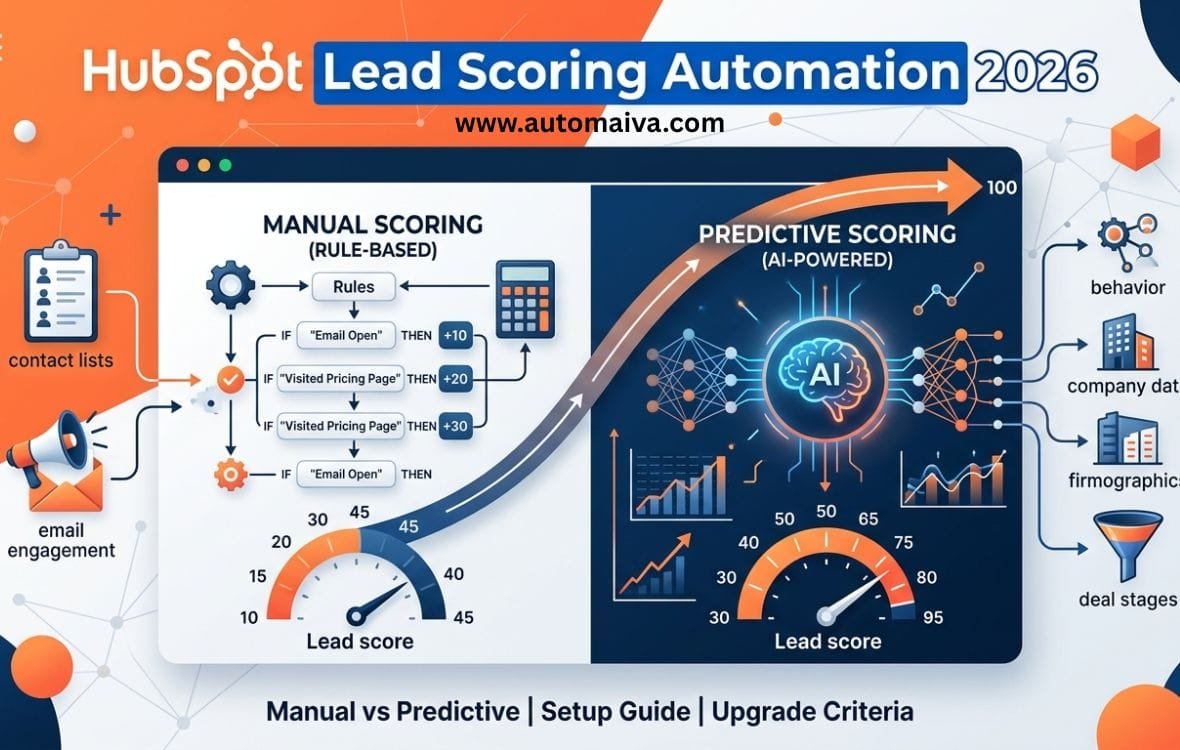
Manual lead scoring is available on HubSpot Sales Hub Professional and above. You define the scoring rules based on contact properties, form submissions, email engagement, page views, and deal stage. HubSpot calculates the score in real time and updates the lead score property automatically.
Step 1 — Navigate to lead scoring settings. In your HubSpot account, go to Contacts → Lead Scoring. If you do not see Lead Scoring in the menu, your account may not have the required permissions or plan tier. Confirm you are on Sales Hub Professional or Enterprise.
Step 2 — Create a new scoring model. Click “Create scoring model.” Name it something descriptive, like “B2B SaaS Lead Score — Product Qualified.” HubSpot allows you to create multiple scoring models for different purposes (e.g., one for outbound leads, one for inbound leads).
Step 3 — Add positive scoring criteria. Positive criteria increase the lead’s score. Typical positive criteria for B2B SaaS:
- Form submissions: +10 for demo request, +5 for content download, +3 for newsletter signup
- Email engagement: +2 per email open, +5 per link click
- Page views: +10 for pricing page, +5 for features page, +3 for blog post
- Meeting booked: +50 (immediately signals high intent)
- Deal stage movement: +20 when deal moves to “Meeting Scheduled”
Step 4 — Add negative scoring criteria. Negative criteria decrease the score. These help filter out unqualified leads. Examples:
- Email unsubscribe: -50 (contact has opted out)
- Bounced email: -30 (invalid contact)
- Job title contains “student” or “intern”: -20 (likely not decision maker)
- Company size under 10 employees and no engagement: -15 (for enterprise-focused SaaS)
- No activity in 60 days: -10 (dormant lead)
Step 5 — Set score thresholds and actions. Define what scores mean for your sales process:
- 0‑20 — Cold lead: Add to nurture sequence, do not send to sales
- 21‑50 — Warm lead: Sales development rep outreach within 5 days
- 51‑80 — Hot lead: Account executive follow‑up within 24 hours
- 81‑100 — Sales‑ready lead: Immediate task created for AE, Slack alert sent
Step 6 — Activate the scoring model and test. HubSpot starts scoring existing contacts immediately. Review a sample of scored leads to verify the logic matches your expectations. Adjust weights and thresholds as needed. The first 30 days are a calibration period — plan to refine your rules weekly.
HubSpot Predictive Lead Scoring: What AI Adds
HubSpot Predictive Lead Scoring is an AI‑powered feature available on Sales Hub Professional and Enterprise. Instead of you defining the rules, HubSpot analyzes your historical win/loss data and automatically identifies which lead characteristics and behaviours correlate most strongly with conversion.
✓ Predictive scoring — What works well
- No manual rule configuration — HubSpot learns from your closed‑won and closed‑lost deals
- Automatically identifies non‑obvious patterns (e.g., leads who view the “pricing” page after reading a specific blog post convert at 3x the rate)
- Score is a probability percentage (0‑100%) of likelihood to close, not an arbitrary point system
- Updates in real time as new data comes in
- Can be used in workflows and lists just like manual scores
✗ Predictive scoring — Limitations to know
- Requires sufficient historical data — HubSpot recommends at least 50 closed‑won and 50 closed‑lost deals in the last 6 months
- No transparency into why a lead received a particular score — you cannot see the exact factors HubSpot weighted
- Less controllable than manual scoring — you cannot override or exclude specific criteria
- May not work well for early‑stage startups with limited historical deal data
How to enable predictive scoring: Go to Contacts → Lead Scoring → Predictive Scoring tab. Click “Generate model.” HubSpot will analyse your deal data and create a predictive model within 24‑48 hours. Once generated, the predictive score property appears on every contact record. You can then use it in lists, workflows, and reports just like a manual score.
Who predictive scoring works for: B2B SaaS companies with at least 12 months of deal history, 50+ closed‑won deals, and consistent sales process data in HubSpot. Predictive scoring is ideal for teams that have outgrown manual rule maintenance and want a hands‑off, AI‑driven approach.
Manual vs Predictive: Real Comparison at 1K, 5K, and 10K Contacts
The table below compares manual and predictive lead scoring across the contact volumes typical for seed, Series A, and Series B SaaS companies.
| Metric | Manual scoring | Predictive scoring |
|---|---|---|
| Setup time | 2‑4 hours (first model) | 24‑48 hours (automatic) |
| Ongoing maintenance | 1‑2 hours per month (adjust rules) | Near zero — model retrains automatically |
| Transparency | High — you see every rule and weight | Low — black box model |
| Accuracy at 1K contacts (seed) | 70‑80% (depends on rule quality) | Not recommended (insufficient data) |
| Accuracy at 5K contacts (Series A) | 75‑85% | 80‑90% (with sufficient deal data) |
| Accuracy at 10K+ contacts (Series B) | 80‑85% | 85‑95% |
| Best for | Teams with limited data, need transparency, or specific scoring logic | Teams with 12+ months of deal data, want hands‑off AI |
The Hidden Cost of Lead Scoring: What HubSpot Doesn’t Tell You
Before you upgrade to HubSpot Professional for lead scoring, there are three hidden costs that HubSpot does not advertise on its pricing page. Understanding these upfront prevents the most common budget surprise in B2B SaaS CRM implementations.
Hidden cost 1: Implementation labor. Setting up manual lead scoring is not a plug‑and‑play feature. You need to map your sales process, define scoring criteria, test the model, and train your sales team. Plan for 8‑12 hours of RevOps or sales operations time to configure the first model. At $75‑$150 per hour, that is $600‑$1,800 in hidden labor.
Hidden cost 2: Data quality clean‑up. Lead scoring only works if your data is clean. Duplicate contacts, inconsistent job titles, and missing company data will skew your scores. Most teams spend 20‑40 hours cleaning their HubSpot database before scoring becomes accurate. That is $1,500‑$6,000 in additional hidden costs.
Hidden cost 3: Ongoing optimization. Manual scoring rules degrade over time. Your target customer profile evolves. Your product changes. Your pricing changes. Plan for 1‑2 hours per month of rule maintenance to keep scoring accurate. Over 12 months, that is 12‑24 hours of ongoing effort.
When to Upgrade from Starter to Professional for Lead Scoring
HubSpot Starter plans do not include lead scoring. The moment you need automated lead prioritization, you must upgrade to Sales Hub Professional (starting at $890/month for 5 users on annual billing). Before you upgrade, ask yourself these four questions:
Question 1 — How many new leads do you receive per month?
If the answer is under 200 leads per month, your sales team can manually review and prioritise leads without scoring. Use a simple spreadsheet or manual triage. Upgrade when you exceed 500 leads per month — the manual effort becomes unsustainable.
Question 2 — Do you have a dedicated RevOps or sales operations person?
Manual lead scoring requires someone to configure and maintain rules. Predictive scoring requires historical deal data. If you have no one to own scoring, the feature will not deliver ROI regardless of the plan.
Question 3 — Are leads falling through the cracks?
If your sales team consistently reports that they “did not know” about hot leads until it was too late, lead scoring will pay for itself. The cost of one lost deal often exceeds the annual HubSpot Professional subscription.
Question 4 — Can you afford the Professional plan?
HubSpot Sales Hub Professional starts at $890/month for 5 users (annual billing). Add mandatory onboarding fees ($3,000) and your Year 1 cost is approximately $12,600. If that number makes you uncomfortable, consider ActiveCampaign (lead scoring included from $49/month) or Pipedrive (lead scoring in Advanced plan at $29/user/month) for lower‑cost alternatives.
Real HubSpot Lead Scoring Examples for B2B SaaS
Below are three real‑world lead scoring configurations for B2B SaaS companies at different stages.
Example 1 — PLG SaaS with free trial (seed stage, 2,000 contacts, manual scoring)
- Positive scoring: +10 for starting a free trial, +5 for inviting a teammate, +3 for each feature used (capped at 30), +15 for reaching trial day 10
- Negative scoring: -20 for not logging in for 7 days, -30 for trial expiry without upgrade, -10 for support ticket about pricing
- Thresholds: 0‑20 = nurture, 21‑50 = SDR outreach, 51+ = AE demo booking
Example 2 — Enterprise B2B SaaS with inbound marketing (Series A, 8,000 contacts, manual scoring)
- Positive scoring: +25 for demo request, +15 for case study download, +10 for pricing page view, +5 per email click (capped at 25), +20 for attending webinar
- Negative scoring: -30 for unsubscribed, -20 for job title “student” or “intern”, -10 for company size under 50 employees, -5 per week of no activity after 30 days
- Thresholds: 0‑30 = nurture, 31‑60 = SDR, 61‑100 = AE
Example 3 — High‑volume PLG SaaS (Series B, 25,000 contacts, predictive scoring)
- Setup: Predictive scoring model trained on 150 closed‑won and 120 closed‑lost deals from the previous 9 months
- Score meaning: Probability percentage (0‑100%) of lead becoming a paying customer within 30 days
- Thresholds: Under 40% = nurture, 40‑70% = SDR outreach, over 70% = AE immediate follow‑up
- Results: Conversion rate from lead to opportunity increased 28% after switching from manual to predictive scoring
Frequently Asked Questions
What is HubSpot lead scoring automation?
HubSpot lead scoring automation is a feature that assigns numeric values to leads based on their behaviour, demographics, and engagement. Scores update in real time. You can use scores to trigger workflows, create tasks, and segment lists. Manual scoring is available on Sales Hub Professional and above. Predictive scoring (AI‑powered) is also available on Professional and above.
How do I set up lead scoring in HubSpot?
Go to Contacts → Lead Scoring → Create scoring model. Add positive criteria (e.g., +10 for demo request) and negative criteria (e.g., -20 for unsubscribe). Set score thresholds and actions. Activate the model. HubSpot will score existing and new contacts automatically. For predictive scoring, generate a model from the Predictive Scoring tab and wait 24‑48 hours for training.
Does HubSpot lead scoring work on the Starter plan?
No. HubSpot lead scoring (both manual and predictive) is only available on Sales Hub Professional and Enterprise. Starter plans include basic contact management and email marketing but no lead scoring. You can manually add a custom “lead score” property and update it via workflows, but there is no native scoring engine on Starter.
What is the difference between manual and predictive lead scoring in HubSpot?
Manual scoring requires you to define rules and weights (e.g., +10 for pricing page view). Predictive scoring uses machine learning to analyse your historical deal data and automatically assign a probability score. Manual scoring is transparent and controllable but requires maintenance. Predictive scoring is hands‑off but less transparent and requires sufficient historical data (50+ closed‑won deals).
How much does HubSpot Professional cost for lead scoring?
HubSpot Sales Hub Professional starts at $890/month for 5 users (annual billing) plus a mandatory $3,000 onboarding fee. Year 1 total is approximately $12,600. For teams with under 5,000 contacts and 500 leads per month, this is often prohibitively expensive. Consider ActiveCampaign (lead scoring included from $49/month) or Pipedrive (lead scoring in Advanced plan at $29/user/month) for lower‑cost alternatives.
When should I upgrade to HubSpot Professional for lead scoring?
Upgrade when you have at least 500 new leads per month, a dedicated RevOps or sales operations person to manage scoring, and the budget to afford the Professional plan ($890/month minimum). If you have under 500 leads per month, use a manual scoring spreadsheet or a custom property in HubSpot Starter. If you have over 1,000 leads per month, Professional will likely pay for itself through improved conversion rates.
Can I use HubSpot lead scoring for churn prediction?
Yes. You can create a separate scoring model for churn risk. Negative criteria might include decreased login frequency, support tickets about cancellations, or no feature usage for 14 days. When a customer’s churn risk score exceeds a threshold, trigger a workflow that alerts your customer success team. This is a common use case for B2B SaaS companies on HubSpot Professional.
Pricing note: All pricing information in this article is accurate as of August 2026 and subject to change. HubSpot’s lead scoring feature availability and pricing tiers may change without notice. Always verify current pricing directly on HubSpot’s official website before making a purchase decision.
More from Automaiva
- HubSpot Discount Code 2026: Every Verified Way to Save on Starter, Professional, and Enterprise
- HubSpot Annual vs Monthly Pricing 2026: How to Save 10-20% by Paying Upfront (Real Examples)
- folk vs HubSpot vs Pipedrive vs Attio 2026: Which CRM Actually Fits a SaaS Startup Under 50 Seats?
- ActiveCampaign vs HubSpot vs Klaviyo for B2B SaaS 2026: Which Email Platform Delivers Best?
- SaaS Churn Prevention: Build an Automated Early Warning System That Saves Accounts Before They Cancel (2026)
Written by the Automaiva Editorial Team